Changing the email address associated with the Hostico client account.
In this tutorial, the procedure applied for changing the email address in the Hostico client account is exemplified.
Introduction
This tutorial will illustrate the steps applied to change the email address in the Hostico customer account;
Requirements
- client account existing Hostico;
Steps
- After logging into the Hostico customer account, click the USER button on the left side of the page;
- The open page will display all personal data belonging to the rights holder;
- In the Client Profile section, go to the Change email address;

In the newly opened window, you will need to insert the new email address that you want in the client account;
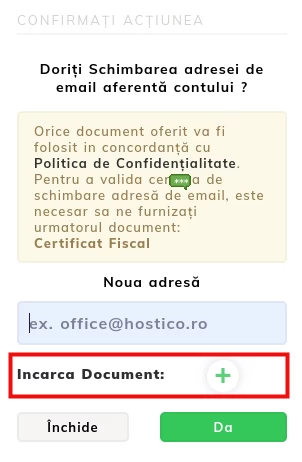
The action will be registered after the client attaches a copy of the identity document (individual)/ copy of the company's certificate from the account (legal entity);
IMPORTANT! - The photo of the identity document must be in the form of a selfie, so that the holder's details can be validated.
For security reasons, this procedure is essential for verifying the account holder of Hostico;
After completing the necessary steps, the last opened box will confirm the submission of your request to change the email address.
Note
After completing the above steps, an automatic ticket will be opened with the request to change the email address;
The change will be processed by the operators of the commercial department, following the review of the attached document;