TutorialsWHM

Viewing subdomains in the WHM administration panel

Learn how to view subdomains in WHM, step by step, to effectively manage accounts. The tutorial provides clear and helpful instructions.

Views 472Updated 1 anPublished on 16/08/2017by Florin Petran

Introduction

  • In this tutorial, we will show you how to view or list subdomains in the WHM administration panel.

Requirements

  • A WHM account

Steps

  • After logging into the WHM administration panel, we will click on Account Information.
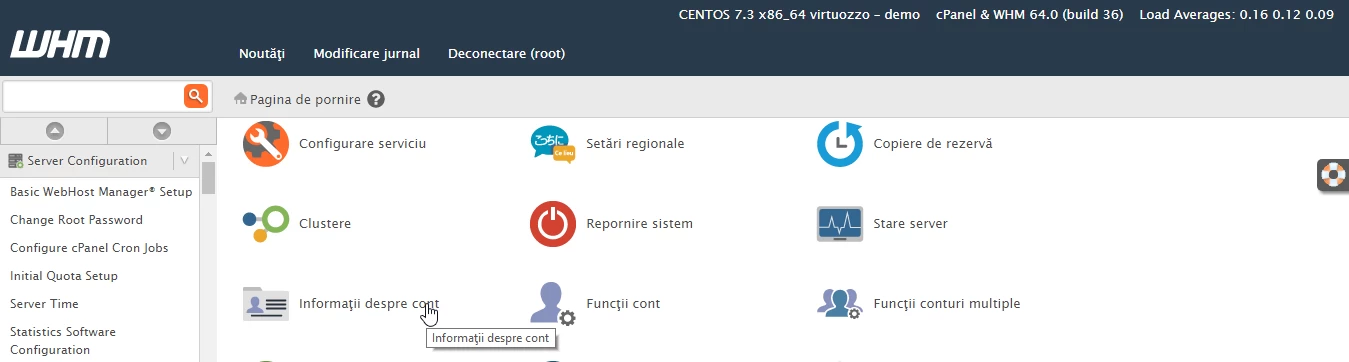
 Information about WHM account

  • After that, we will click on Subdomain List.
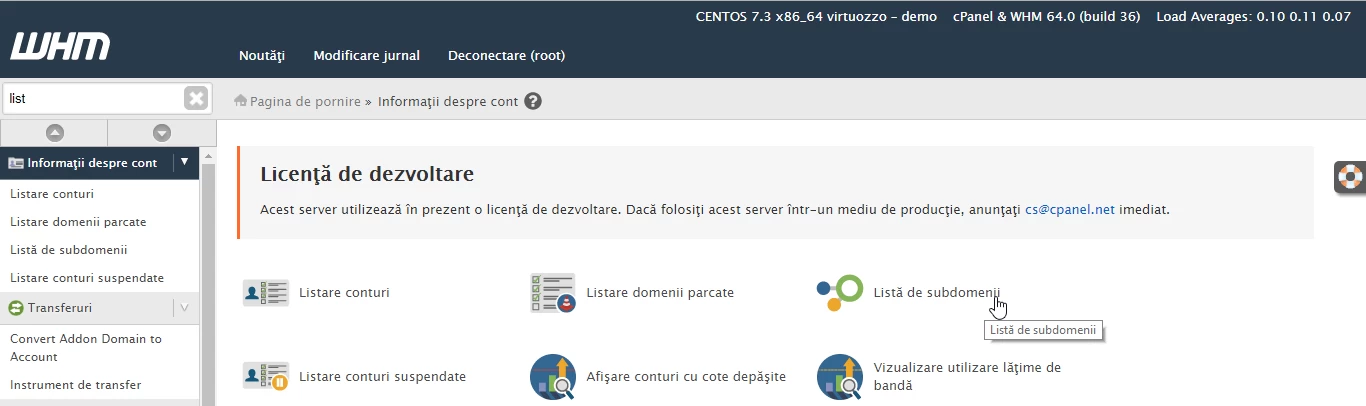
Lista de subdomenii WHM

  • In the next page are displayed the subdomains, client.hostico.ro is our example subdomain.
  • In the table below we have the following information: Domain - hostico.ro (the domain to which the subdomain client.hostico.ro is added), User/utilizator - hostico, Subdomain - our subdomain client.hostico.ro.

Prezentare lista subdomenii


Similar Articles

DNS settings in the Webuzo panelTutorials /Webuzo

Learn how to edit and set DNS records in the Webuzo panel. Follow the steps to effectively manage domains and subdomains.

48
by Alexandru Rogojan
Views 2411
Updated 1 year ago
Published on 14/09/2017
Changing the PHP version in cPanel on VPS hosting packages via MultiPHP ManagerTutorials /cPanel

In this article, we will present the necessary steps to change the PHP version in a cPanel account using MultiPHP Manager.

46
by Sebastian Szlivka
Views 2633
Updated 1 year ago
Published on 18/10/2017
Installing an application using the cPanel Softaculous pluginTutorials /Softaculous

Find out how to install web applications using the cPanel Softaculous plugin. A step-by-step guide for installing WordPress and managing applications.

15
by Sebastian Szlivka
Views 4825
Updated 1 year ago
Published on 10/10/2017
Accessing the site from hosting without changing nameservers through the hosts fileTutorials /Domains

In this tutorial, we will go through the necessary steps to access a website hosted on a server without needing to make a change at the nameserver level, using the operating system's hosts file.

5
by Cătălin Adrian
Views 3060
Updated 1 year ago
Published on 24/01/2018
File management with File Manager from the cPanel control panelTutorials /cPanel

Learn how to use the File Manager in cPanel to manage files and directories, including copy, move, delete, and edit operations.

4
by Alexandru Rogojan
Views 1933
Updated 1 year ago
Published on 30/05/2019