Frequently Asked Questions • Dev
I can't find the .htaccess file using the File Manager in cPanel. How can this be resolved?
Can't find the .htaccess file in cPanel? Enabling the "Show Hidden Files" option in File Manager will allow you to view and edit hidden files.
Views 1825Updated 2 aniPublished on 10/09/2018by Sebastian S.
There may be cases when listing files through the File Manager in cPanel, the .htaccess file or other hidden files (with a dot in front) do not appear.
The problem is most often caused by the fact that the Show Hidden Files (dotfiles) option in the File Manager is unchecked.
- To activate the hidden files listing we will click on the Settings button at the top right of the File Manager interface.

- In the window that will appear, we will ensure that the Show Hidden Files (dotfiles) option is checked, after which we will click the Save button.
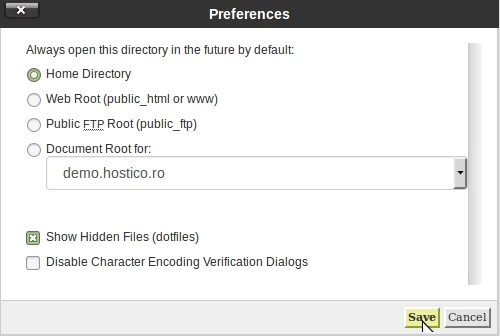
- After saving, all hidden files, including .htaccess, will become visible and editable.