Frequently Asked QuestionsDev

I can't find the .htaccess file using the FileZilla FTP client. How can this be resolved?

Can't find the .htaccess file in FileZilla? Enabling the "Force Showing Hidden Files" option from the Servers menu will help you view hidden files.

Views 629Updated 4 aniPublished on 10/09/2018by Sebastian Szlivka

There may be cases where, when listing files through an FTP client such as FileZilla, the .htaccess file or other hidden files (with a dot in front) do not appear.
The problem is most often caused by the FTP client's settings not allowing the visualization of this type of file.

  • To activate the listing of hidden files, click on Servers from the options bar in FileZilla, then check the Force Showing Hidden Files option.
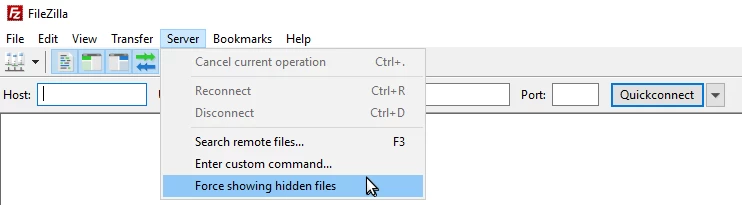
  • If we receive a warning message from the application, we will click the ok button.
  • After saving, all hidden files, including .htaccess, will become visible and editable.

Similar Articles

How can I publish or upload my website on the Internet?Frequently Asked Questions /Random

Learn how to publish your website on the Internet using an FTP client or a file manager in the control panel. Useful tutorials available!

9
by Andrea Zemba
Views 2117
Updated 3 years ago
Published on 26/07/2018
Can I install WordPress, Magento, PrestaShop, and other applications on hosting?Frequently Asked Questions /Dev

Discover in the passage below if you can install WordPress, Magento, PrestaShop, and other applications on hosting

5
by Sebastian Szlivka
Views 1287
Updated 1 year ago
Published on 16/01/2019
Why isn't my website working?Frequently Asked Questions /Random

Find out the main reasons why your website is not functioning correctly and how to quickly resolve these issues.

2
by Mark Dohi
Views 519
Published on 02/07/2025
What is an FTP client and how can I use one?Frequently Asked Questions /Dev

Find out what an FTP client is and how to use it to quickly transfer files between your computer and servers, effectively managing your website files.

1
by Florin Petran
Views 1215
Updated 1 year ago
Published on 26/07/2018
I can't find the .htaccess file using the File Manager in cPanel. How can this be resolved?Frequently Asked Questions /Dev

Can't find the .htaccess file in cPanel? Enabling the "Show Hidden Files" option in File Manager will allow you to view and edit hidden files.

by Sebastian Szlivka
Views 1205
Updated 1 year ago
Published on 10/09/2018